Software Engineering Insights to AI DLC Insights Transition
AIDI is not a lift-and-shift or one-click upgrade from SEI. Instead, it represents a fresh, forward-looking setup that is purpose-built to deliver clarity, efficiency, and scalability for modern engineering organizations. This page outlines the experience and steps needed for SEI users to transition successfully to AIDI.
AIDI is a re-imagined platform. It will live side-by-side with SEI during your transition journey. You will continue to have full access to SEI while setting up AIDI from the ground up.
There is no automated migration or porting of SEI configurations, dashboards, or metrics into AIDI. The transition allows you to re-establish what matters most and configure AIDI for maximum business alignment and usability.
This transition is your opportunity to start fresh, remove technical debt, and align SEI to the priorities of your engineering org today. AIDI was built to scale, simplify, and support deep insights—and this transition enables exactly that.
| Role | Responsibilities |
|---|---|
| SEI Admin | Leads Org Tree and Profile setup. Manages rollout of Insights. |
| Team Manager | Supports Team Tools and Developer configuration. Enables feedback. |
| Harness Team | Product support, and onboarding guidance via online documentation and videos. |
Transition workflow
- Harness creates the AIDI experience initially using existing SEI context (if applicable).
- SEI Admin and Managers can validate, provide feedback, and adjust structures.
-
Enablement
- At General Availability (GA), AIDI is in disabled state within the same Harness account as SEI for customers who are already on SEI. To enable access to AIDI please reach out to SEI customer support.
- Once enabled, It will appear as “Insights 2.0” under a new navigation item for Account Admins.
- Can be created in the same or a separate project.
- SEI remains fully operational and unchanged until formal sign-off.
-
Org Tree & Profile Creation
- Led by SEI Admin
- Import Developers into Harness SEI using a CSV file.
- Define Org Trees: Reflect your org structure, teams, and reporting.
- Create Profiles: Align metrics to teams, roles, and use cases.
-
Team & Developer Setup
- Led by Team Managers
- Configure team settings and map developers to the right profiles.
- Ensure accurate ownership for insights and feedback loops.
-
Insights Activation
- Enable and configure AIDI insights as features roll out.
- Include DORA metrics, Productivity metrics, and Business Alignment widgets.
-
Validation & Feedback
- Iterate through early use and gather stakeholder feedback.
- Refine Org Trees, Profiles, and Metrics definitions based on goals.
-
Sign-Off & Cutover
- When confident, formally sign off on AIDI.
- SEI can then be deprecated; AIDI becomes the sole experience.
What stays the same during the transition
- Your SEI data, dashboards, and reports remain untouched
- Teams can continue to operate as-is in SEI while exploring AIDI
What changes with AIDI
- Re-imagined user experience and UI
- Near real-time data infrastructure
- Streamlined metrics setup and ownership
SEI to AIDI
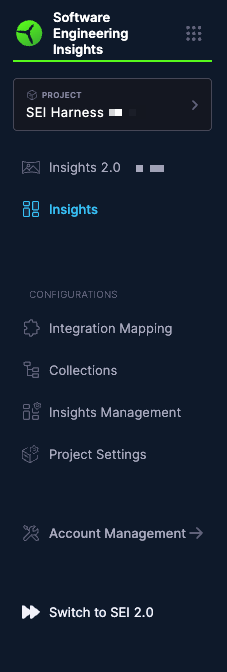
To access the latest AIDI experience, click Switch to 2.0 below Account Management in the Harness SEI navigation menu.
AIDI to SEI
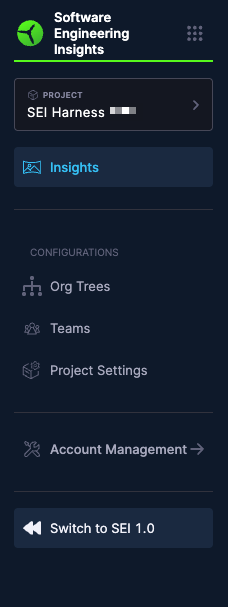
To return to the SEI experience, click Switch to 1.0 below Account Management in the Harness SEI navigation menu.
You can switch back at any time without losing your existing data.