What is a Tag?
A tag in Harness Database DevOps is a marker that identifies the state of your database at a specific point in time. Tags represent versions, releases, or checkpoints and are essential for enabling targeted rollbacks and traceable deployments.
Tags are recorded in the DATABASECHANGELOG table, a Liquibase-managed audit table that tracks every changeset applied to your database. You can create tags using either the tag command (manual, applied at deployment time) or the tagDatabase Change Type (changelog-driven, version-controlled alongside your schema).
Tag command
The tag command marks the current database state by writing a label to the most recent row in the DATABASECHANGELOG table. No changeset is created or executed; it is a metadata-only operation.
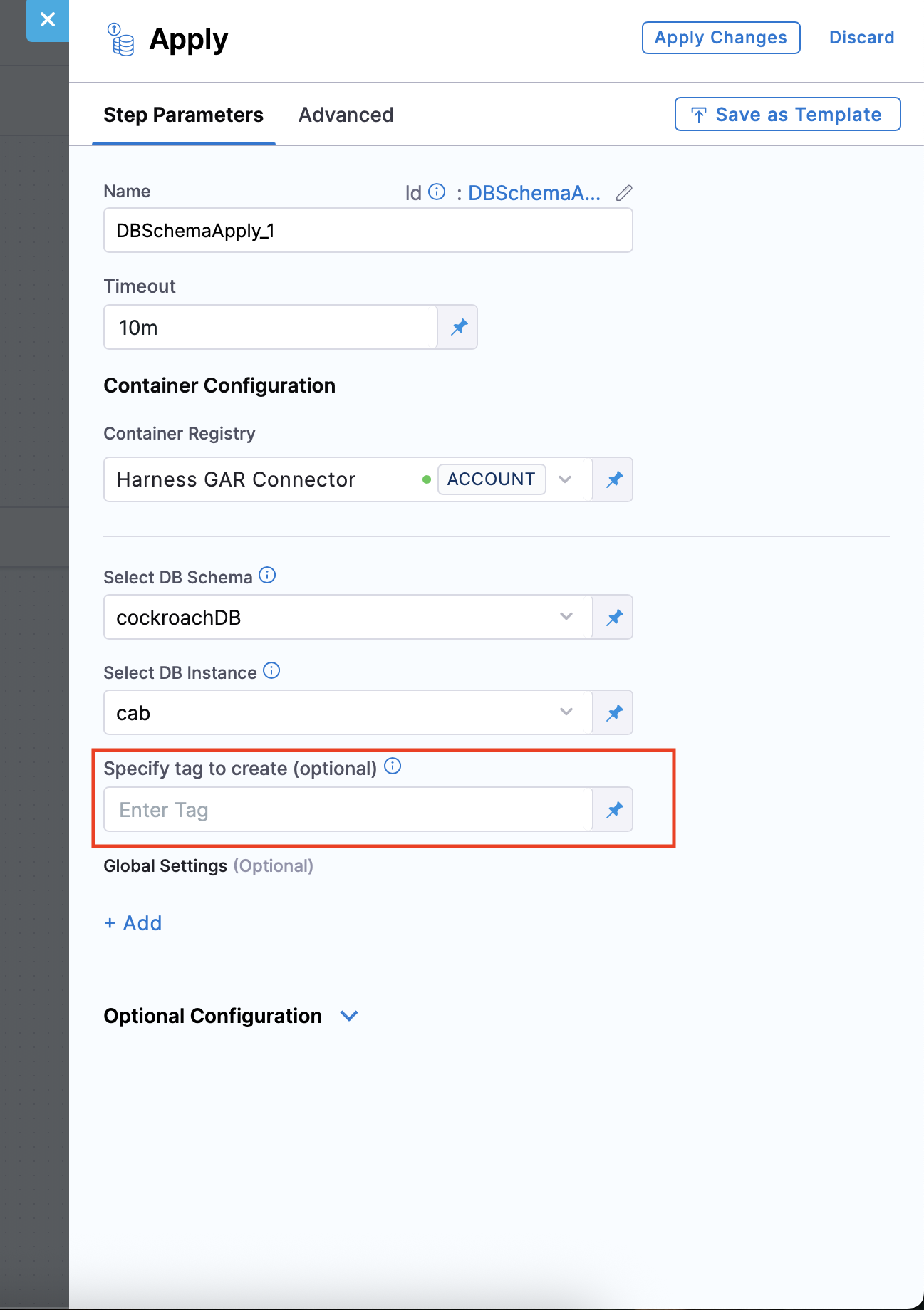
When you use the Harness Database DevOps apply step, tagging works in two phases:
- The apply step checks whether the current database state is tagged before applying changes. If no tag exists at that point, it creates one automatically to guarantee a rollback target before any new changesets run.
- After all changesets are applied, the apply step writes a post-deployment tag using the name you provided in the tag input field on the step configuration.
The post-deployment tag is skipped when a deployment applies zero changesets. If no changes were deployed, no new tag is written. Go to Tag Database Changeset to learn how to record a tag anchor even on no-op deployments.
tagDatabase change type
The tagDatabase Change Type embeds a tag inside a changeset, making it part of your version-controlled changelog. When Liquibase executes this changeset, it inserts a new row into the DATABASECHANGELOG table containing the specified tag.
databaseChangeLog:
  - changeSet:
      id: tagDatabase-example
      author: john-doe
      changes:
        - tagDatabase:
            tag: version_1.1
Behavior
- Inserts a new row into
DATABASECHANGELOGwith the specified tag value. - Can be used as a target for
update-to-tag(deploy only up to this tag) androllback(revert all changes after this tag). - Cannot be combined with other Change Types in the same changeset due to Liquibase XSD schema restrictions. Attempting to combine them causes a Liquibase validation error before any SQL is executed.
When to use which
| Use case | Use tag | Use tagDatabase |
|---|---|---|
| Manual tagging before rollback testing | ✅ | ❌ |
| Changelog-driven version tracking | ❌ | ✅ |
| CI/CD-based release tagging | ❌ | ✅ |
| Creating lightweight checkpoints | ✅ | ❌ |
The tag command suits one-off, runtime checkpoints (for example, tagging before a hotfix). The tagDatabase Change Type suits repeatable, release-aligned tagging baked into your changelog.
Best practices
- Tag after every application release to mark a known stable database state.
- Use semantic versioning for tag names:
v1,v1.1,v2. - Ensure tags reflect meaningful checkpoints so rollbacks target predictable states.
Sample tag flow
changeset1
changeset2
tag v1
changeset3
tag v1.1
changeset4
changeset5
tag v2
This structure allows rollbacks to specific versions based on real release points.
| Tag | Includes changes |
|---|---|
| v1 | changeset1, changeset2 |
| v1.1 | changeset3 |
| v2 | changeset4, changeset5 |
Frequently asked questions
Can I roll back to a tag using Harness?
Yes. Use the rollback command with a tag name to revert all changesets applied after that tag. Harness supports rollback strategies via the pipeline rollback step.
Should I tag before or after a release?
Tag immediately after deploying a release. This creates a stable checkpoint with a name that matches the release, making rollback targets intuitive. The Harness apply step automatically creates a pre-deployment tag as well, so a rollback point always exists before new changes are applied.
Does tagging affect my database schema or data?
No. Tags are metadata entries in the DATABASECHANGELOG table only. They do not modify your database schema or data.
Can I preview which changesets will be rolled back by a tag?
Yes. Use the rollback SQL preview command or review Harness pipeline logs to see which changesets will be reverted before executing a rollback.
Related concepts
- Tag Database Changeset: Configure the apply step to record a tag anchor even on no-op deployments.
- Automatic and custom rollback: Set up rollback strategies in Harness Database DevOps pipelines.
- What is a Changeset?: Understand the unit of change that tags mark in the DATABASECHANGELOG table.
- Using rollback tags with apply schema step: Step-by-step guide to configuring rollback targeting with tags.