Harness Cloud & AI Cost Management (CACM) Overview
Harness Cloud & AI Cost Management (CACM) is a full-featured FinOps platform designed to help organizations monitor, govern, and optimize their cloud and AI expenditures. It provides deep visibility into spending across major cloud providers: AWS, Azure, and Google Cloud Platform (GCP), as well as AI providers like Anthropic, OpenAI, including managed AI offerings like AWS Bedrock and Google Vertex. Additionally, CACM allows you to integrate external cost data, such as SaaS costs and data center expenses, for a unified view of your organization's total technology spend.
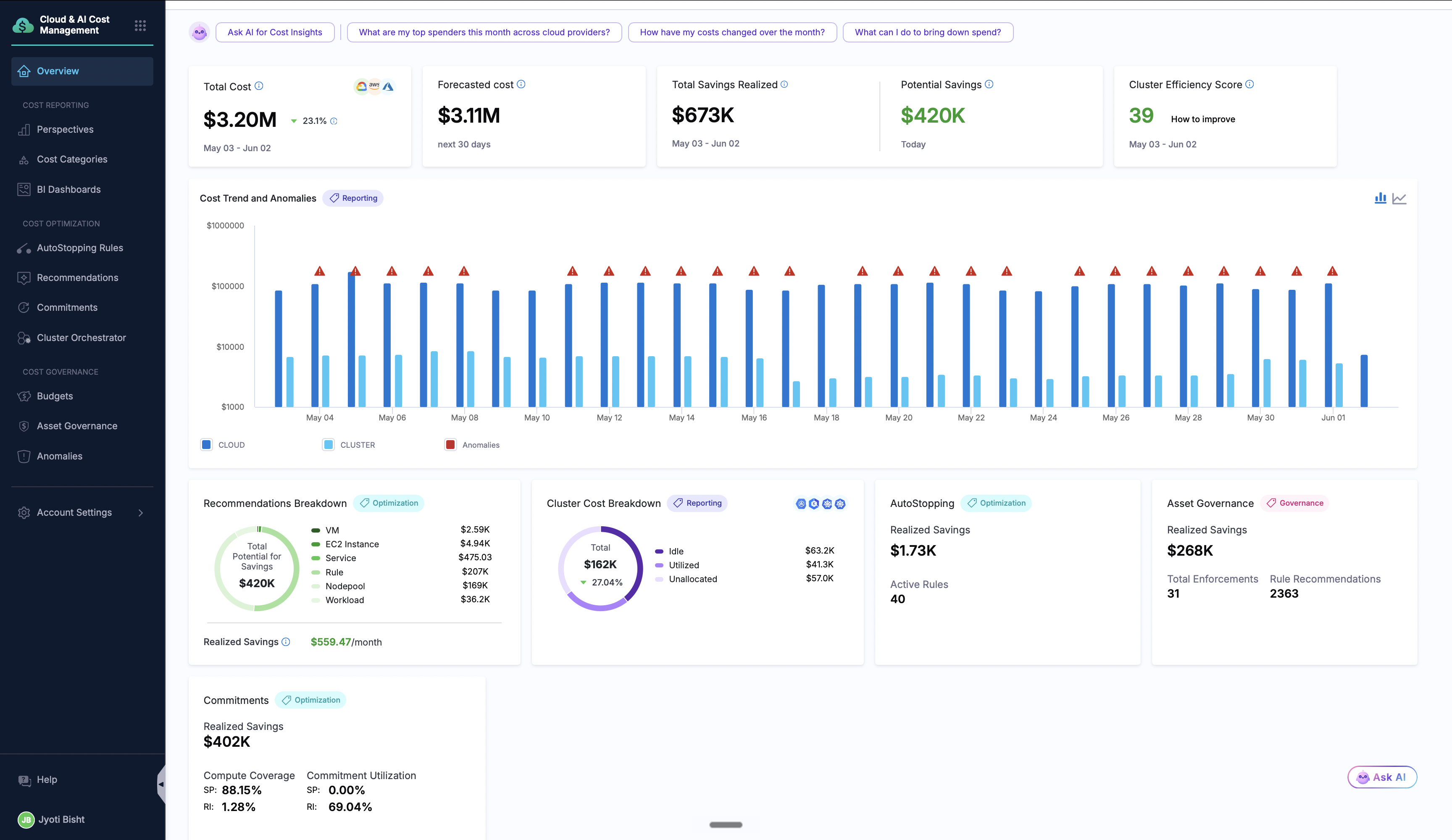
The Three Pillars of CACM
Cost Visibility
- Perspectives (Now Cost Explorer with Cloud & AI costs): Custom views to analyze cloud and AI costs by provider, service, region, tags, or business units. Organize them into folders, share with teams via RBAC, and use the "Ask AI" feature to create perspectives using natural language. Track spending on AI providers like Anthropic, OpenAI, and managed AI providers like AWS Bedrock and GCP Vertex AI, analyze token usage, and understand AI cost growth patterns.
- BI Dashboards: Pre-built and customizable business intelligence dashboards powered by Looker. Visualize cost trends, compare spending across teams or projects, and create executive-level reports. Dashboards can be scheduled, shared, and embedded to keep stakeholders informed without requiring them to log into CACM.
- Cost Categories: Define custom cost allocation rules to map cloud and AI spending to your business structure. Group resources by team, product, cost center, or any business dimension. The same rules you've written for cloud chargeback now apply to AI spend.
Cost Governance
-
Budgets: Set daily, weekly, monthly, quarterly, or yearly spending limits tied to perspectives. Configure multiple alert thresholds and receive notifications via email or Slack before costs exceed budget. Available for both cloud & AI costs.
-
Asset Governance: Enforce cloud policies using policy-as-code. Create rules to identify non-compliant resources (untagged, idle, misconfigured), group them into rule sets, and schedule automatic evaluations with alerts for violations.
-
Anomaly Detection: ML-powered detection of unusual spending patterns with configurable sensitivity, status management (Active/Resolved/Archived), and automated alerts to catch cost spikes early. Available for both cloud & AI costs.
Cost Optimization
-
Recommendations: AI-powered suggestions to right-size Kubernetes workloads, node pools, EC2 instances, ECS services, and Azure VMs. View potential savings, create Jira/ServiceNow tickets, and track which recommendations have been applied.
-
AutoStopping: Automatically stop idle non-production resources based on traffic or schedules. Supports EC2, ECS, RDS, Azure VMs, and GKE clusters. Typically saves 60-70% on non-production costs with zero code changes.
-
Commitment Orchestration: Automate AWS Reserved Instance and Savings Plan management. Analyze coverage and utilization, track savings vs. on-demand pricing, and let Harness automatically purchase optimal commitments or use manual approval mode.
-
Cluster Orchestrator: Intelligent Kubernetes cluster management that automatically optimizes node pools, manages spot instances, and handles workload bin-packing. Reduces cluster costs while maintaining performance and availability SLAs.
Why Harness' Cloud & AI Cost Management?
-
AI Cost Visibility with Unit Economics: As AI adoption accelerates, so do costs. CACM tracks spending on AI providers like Anthropic, OpenAI, and Gemini, and managed AI providers like AWS Bedrock and GCP Vertex AI, breaking down costs by model, monitoring token usage, and helping you understand where your AI budget is going. More importantly, CACM ties every dollar of AI spend to the agent, session, and business outcome it produced giving you cost per agent run, cost per session including multi-turn conversations, cost per inference, cost broken down by token type, session, inference and use-case, and agent ROI tied to business outcomes (cost per resolved ticket, cost per completed workflow, cost per customer interaction).
-
Actionable, Not Just Informative: Unlike tools that only show dashboards, CACM takes action. AutoStopping shuts down idle resources, Cluster Orchestrator optimizes nodes, and Commitment Orchestration purchases RIs automatically—turning insights into savings without manual effort.
-
Built for Modern Infrastructure: Native support for Kubernetes, containers, serverless, and AI workloads. CACM understands cloud-native architectures, not just VMs and storage buckets.
-
Trace-Level Cost Decomposition for AI: Cost can be analyzed by agent, by session and conversation, by individual run, and step-by-step within a run—all the way down to the model and tool invoked at each step. Expensive workloads surface, worst-case behavior becomes visible instead of being averaged away, and the same dimensions plug into Cost Categories, Perspectives, and Budgets.
-
Governance at Scale: Policy-as-code enforcement ensures compliance across hundreds of accounts. Automatically detect untagged resources, idle infrastructure, and security misconfigurations before they become costly problems.
-
Integrated with Your Workflow: Create Jira or ServiceNow tickets directly from recommendations. Receive alerts via Slack or email. CACM fits into how your teams already work.
-
Proven ROI: Organizations typically see 20-30% reduction in overall cloud & AI spend, with non-production savings of 60-70% through AutoStopping alone.
The NEW Overview Experience
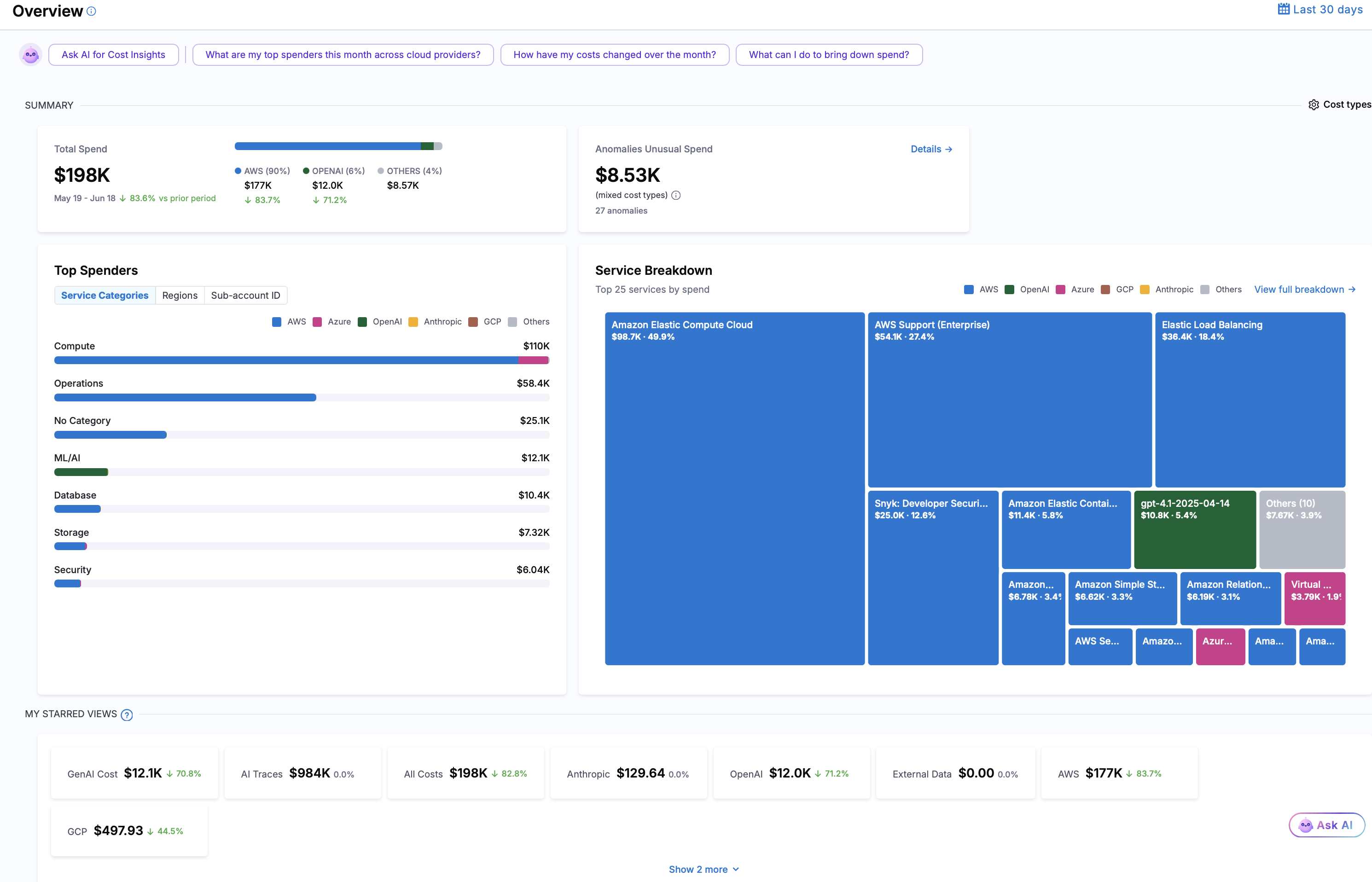
The new Overview Experience is behind a feature flag. Please reach out to your Harness account team to enable this feature.
Summary Section
Displays your key cost metrics at a glance:
-
Total Spend: Your total cloud costs for the selected time period
- Shows trend vs. previous period (up, down, or stable)
- Breaks down costs by cloud provider and LLM Services
-
Anomalies: Unusual cost patterns detected automatically
- Alerts you to unexpected spending changes
- Shows impact of anomalies
- Click to investigate and set rules
Top Spenders Section
Identifies what's costing you the most money. Switch between three views:
-
By Service: Top services costing you money (EC2, RDS, S3, Lambda, etc.)
- Helps identify which services to optimize
- Shows breakdown by cloud provider and LLM providers for each service
- Click to drill down into details in Cost Explorer
-
By Region: Top regions with highest costs (us-east-1, eu-west-1, etc.)
- Helps identify regional cost concentrations
- Useful for understanding geographic spending
- Shows which regions need attention
-
By Cloud Account: Top cloud accounts with highest spending
- Useful for chargeback and cost allocation
- Shows spending by team or department
- Helps identify accounts that need optimization
Each view shows the top 7 items with cost trends and provider breakdown.
Service Breakdown Section
Visual breakdown of your costs across all cloud services using an interactive treemap chart.
What you see:
- Each service shown as a tile
- Larger tiles = higher costs
- Color indicates cloud provider (AWS, Azure, GCP)
- Service name and cost amount on each tile
- Cost trend indicator (up/down/stable)
Hover over tiles to see exact costs and percentages, click tiles to drill down into service details, click "View Full Breakdown" to open Cost Explorer for detailed analysis and identify which services are costing the most at a glance
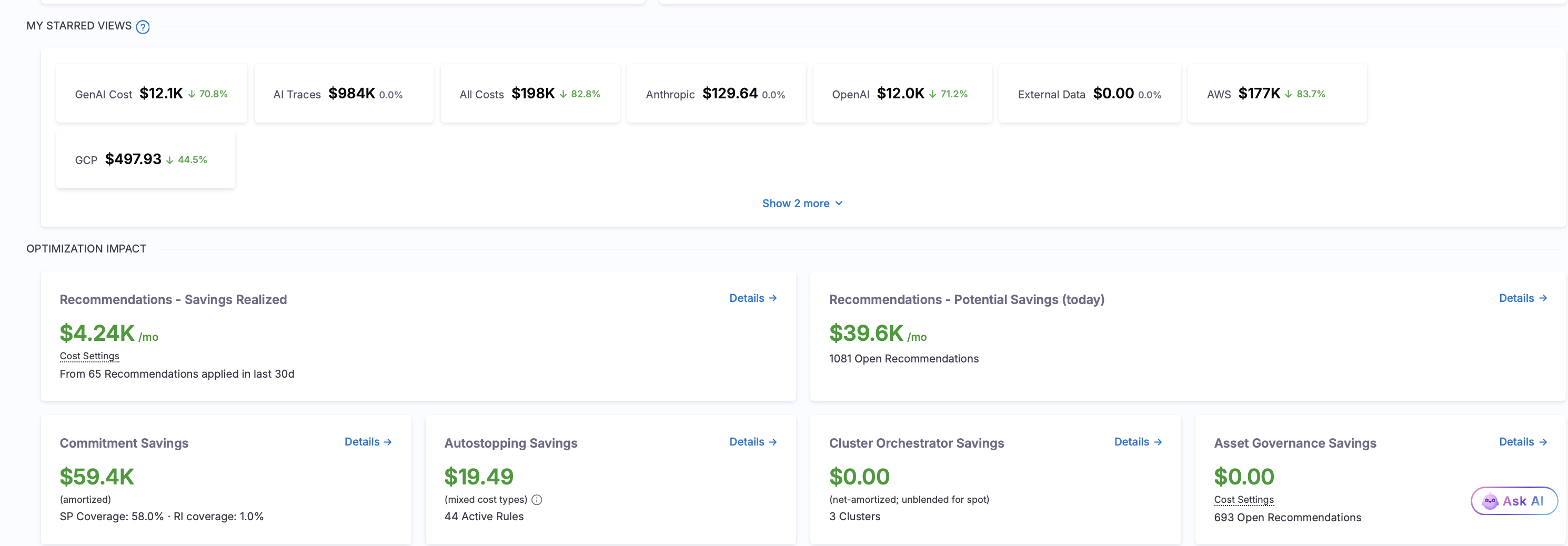
Starred Views Section
Quick access to your favorite custom cost views (Cost Explorer).
What you see:
- Cards for each of your starred perspectives
- Each card shows View name and summary
- Direct links to view full perspective details
What you can do:
- Click any card to open that View in Cost Explorer
- Star Views in Cost Explorer to add them here
- Unstar Views to remove them
- Create custom Views for specific analysis needs
Optimization Impact Section
Shows how much money you're saving (or could save) through optimization features.
- Recommendations: Savings realized and potential savings opportunities
- AutoStopping Savings: Savings from automatically stopping idle resources
- Asset Governance Savings: Cost impact of enforced governance policies and compliance rules
- Commitment Savings: Savings from optimized Reserved Instances and Savings Plans coverage
- Cluster Orchestrator Savings: Savings from intelligent Kubernetes resource optimization and autoscaling
Customizing Your View
Cost Type Selection
You can customize how costs are displayed to match your needs.
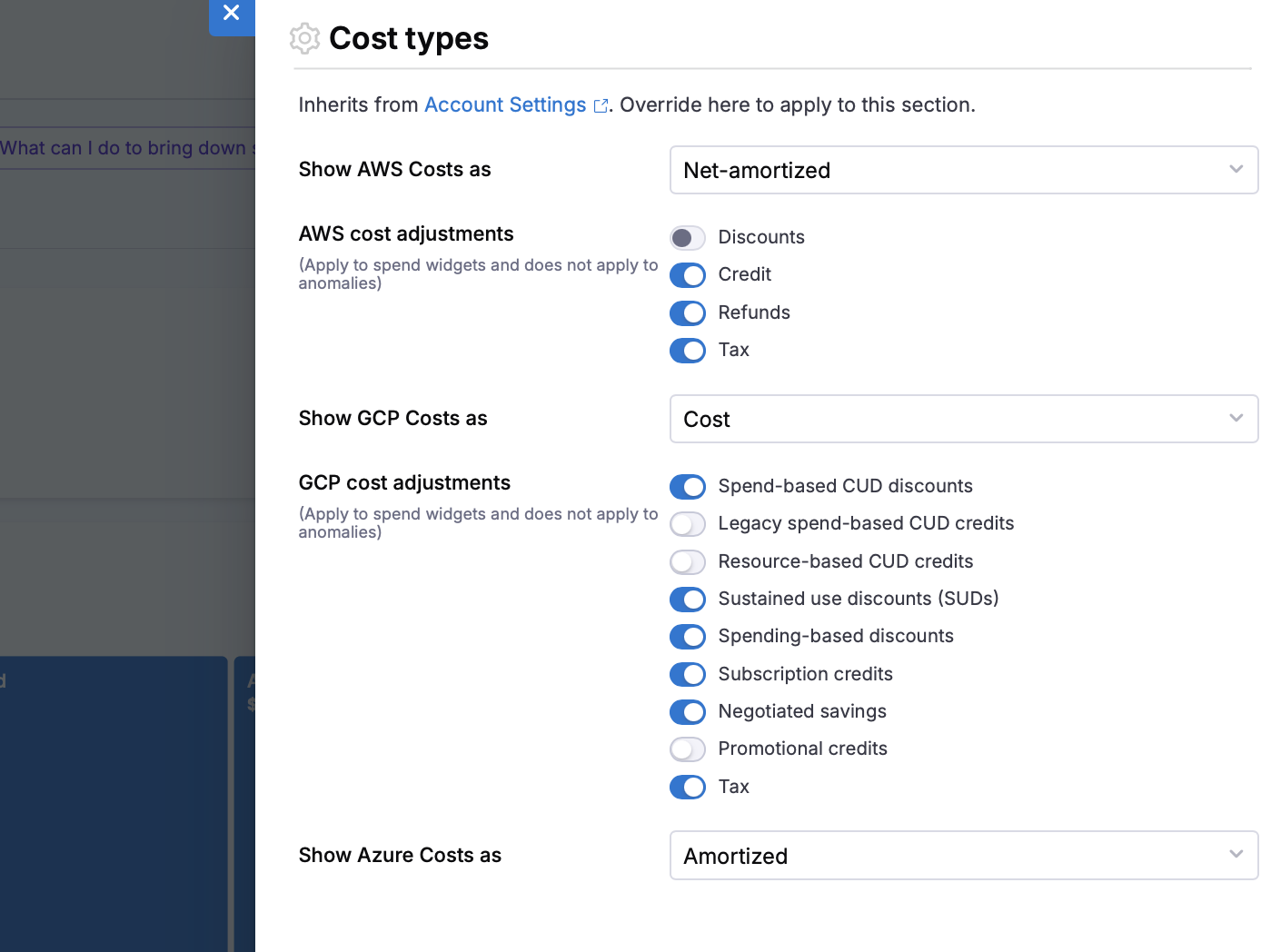
AWS:
Cost Types Available:
- Amortized: Upfront costs spread evenly over time
- Net Amortized: Amortized cost minus discounts
- Unblended: Raw cost before any adjustments
- Blended: Weighted average cost across accounts
- Effective: Actual cost after all adjustments
- List: Standard pricing before discounts
Cost Adjustments (include or exclude):
- Discounts (volume discounts, reserved instance discounts, etc.)
- Credits (promotional credits, service credits, etc.)
- Refunds (returned charges, corrections, etc.)
- Taxes (sales tax, VAT, etc.)
GCP:
Cost Types Available:
- Cost: Actual cost after all discounts and credits
- List: Standard pricing before discounts
Cost Adjustments:
- Spend-based CUD discounts: Discounts based on spending commitments
- Legacy spend-based CUD credits: Historical commitment credits
- Resource-based CUD credits: Commitment credits tied to specific resources
- Sustained use discounts (SUDs): Automatic discounts for consistent usage
- Spending-based discounts: Volume-based pricing reductions
- Subscription credits: Pre-purchased credit packages
- Negotiated savings: Custom negotiated rates
- Promotional credits: Time-limited promotional offers
- Tax: Sales tax and VAT
Azure:
Cost Types Available:
- Actual: Real cost incurred
- Amortized: Upfront costs spread evenly over time
- List Actual: Standard pricing before discounts
- List Amortised: Standard pricing spread over time